Welcome to Clojure!
Clojure is a dynamic development environment where you interact with your program while you write it, growing and adding to it while it’s running. To work with Clojure you need an editor that supports evaluation in source files and structural editing (working with nested forms in addition to character editing).
Install these first:
The details will depend on your operating system and editor but the essential flow for all of them is the same:
Create or open a file
Connect a Clojure environment (aka the REPL)
Write Clojure code in your editor
Evaluate the code in your editor using the connected environment
Repeat!
Learn more:
REPL - learn more about the REPL and how to use it interactively
Structural editing - working with code as forms, not text
There are many ways to learn the Clojure language. This tutorial covers the basics:
If you’d like to work from a book, these are some excellent starting points:


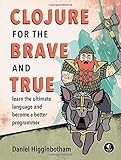

If you’d like to try some practice problems:
4Clojure - a large set of Clojure practice problems
exercism Clojure track - larger problems with mentor support
Also check out:
Clojure Camp - an interactive community for beginner Clojure developers
Other learning resources for more options…
There are many places to interact with other Clojure developers:
Ask Clojure [official] - Clojure Q&A and knowledge base
Clojurians Slack channel - Clojure live chat, check out #beginners, #jobs, etc
Clojureverse - Clojure forum
Original author: Alex Miller
